Using restRoot to load REST file contents into an interactive ROOT-shell
Table of contents
- Objects created by restRoot
- First checks
- Moving Through Entries
- Inspecting Metadata
- Inspecting Observables
- Using The ROOT Browser
- Drawing And Browsing Events
- Dataset Files
- Common Problems
restRoot is the standard interactive shell for inspecting REST files. It starts a ROOT session with the REST libraries loaded and, when a REST file is given as an argument, it opens the file using the REST macro REST_OpenInputFile.C.
restRoot myFile.root
For a REST run file, the macro creates a few objects directly in the interactive session. This is usually the quickest way to understand what is stored in a file before writing a longer macro or analysis script.
Objects created by restRoot
When the input file contains a TRestRun, restRoot creates the following objects:
| Object | Type | Purpose |
|---|---|---|
run | TRestRun | Main run object. It gives access to metadata, entries, event objects, and file-level information. |
ana_tree | TRestAnalysisTree | Tree containing the analysis observables produced by REST processes. |
ev_tree | TTree | ROOT tree containing the serialized event branch. |
ev | input event class | Pointer to the current REST event, for example a TRestRawSignalEvent, TRestDetectorSignalEvent, TRestDetectorHitsEvent, or TRestTrackEvent. |
The input event type depends on the processing stage stored in the file. For example, a raw data file may contain a TRestRawSignalEvent, while a later reconstruction file may contain a TRestTrackEvent.
restRoot also prints the metadata objects found in the file. When possible, it creates variables for those metadata objects using their metadata names, so they can be inspected interactively from the ROOT prompt.
First checks
Once the file is open, start by checking the number of entries and the event type:
run->GetEntries();
run->GetInputEventName();
ev->ClassName();
To print a summary of the run and the current event:
run->PrintMetadata();
ev->PrintEvent();
If the file contains an analysis tree, print the available observables:
ana_tree->PrintObservables();
The observables are the quantities produced by REST processes during the data processing chain. They are stored separately from the event object, which contains the event data itself.
Moving Through Entries
Use TRestRun to load a different entry:
run->GetEntry(0);
ev->PrintEvent();

run->GetEntry(10);
ev->PrintEvent();
After calling GetEntry, the ev pointer is updated to the selected event. This makes it possible to inspect, draw, or print different events without reopening the file.
If you know the REST event ID instead of the tree entry number, you can ask TRestRun to find it:
run->GetEventWithID(7);
ev->PrintEvent();
Entry numbers and event IDs are not always the same. Entry numbers are the positions inside the file, while event IDs are identifiers stored in the event metadata.
Inspecting Metadata
Metadata objects describe how the file was produced: run information, detector setup, gas properties, electronics configuration, process configuration, and other contextual information depending on the application.
To list and inspect the metadata stored in the file:
run->GetMetadataNames();
run->PrintMetadata();
To retrieve one metadata object by name:
auto md = run->GetMetadata("metadataName");
md->PrintMetadata();
Replace "metadataName" with one of the names printed by GetMetadataNames() or by the file-opening summary.
Inspecting Observables
The analysis tree can be inspected with the usual ROOT drawing commands, but through the object already opened by REST:
ana_tree->PrintObservables();
ana_tree->Draw("observableName");
For example, after identifying an observable name with PrintObservables(), it can be plotted directly:
ana_tree->Draw("tckAna_MaxTrackEnergy");
Several observables can also be combined in the usual ROOT syntax:
ana_tree->Draw("tckAna_MaxTrackEnergy:tckAna_TotalTrackLength");
The exact observable names depend on the processes that were used to produce the file.
Using The ROOT Browser
Because restRoot is a ROOT session with REST loaded, the standard ROOT TBrowser can also be used:
new TBrowser;
This is often the most convenient way to explore the contents of a REST file interactively. For example, it can be used to open the analysis tree, browse the observable branches, draw observable distributions, or make two-dimensional plots by selecting different observables for the axes.
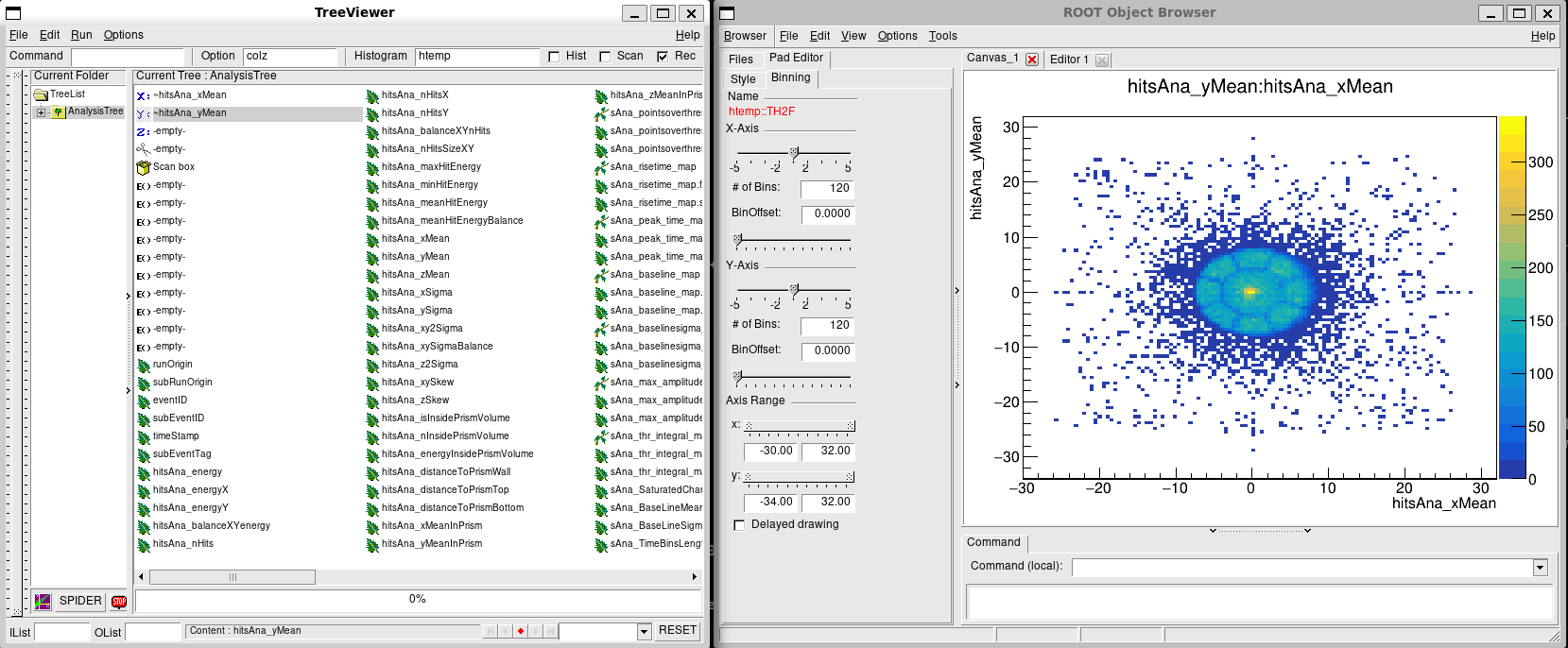
ROOT TBrowser and TreeViewer opened from a restRoot session. The example shows a Micromegas calibration hitmap produced by drawing hitsAna_yMean:hitsAna_xMean from the REST analysis tree using the colz option.
The usual ROOT drawing options are available from the browser or from the prompt. For example:
ana_tree->Draw("tckAna_MaxTrackEnergy");
ana_tree->Draw("tckAna_MaxTrackEnergy:tckAna_TotalTrackLength");
ana_tree->Draw("tckAna_MaxTrackEnergy:tckAna_TotalTrackLength", "", "colz");
This is especially useful when the goal is to quickly check which observables are present, compare their distributions, or identify reasonable cuts before writing a dedicated analysis macro.
Drawing And Browsing Events
The current event can be drawn from the interactive prompt:
ev->DrawEvent();
For signal-like event types, drawing options may be passed to DrawEvent. For example:
ev->DrawEvent("ids[800,900]:printIDs");
For interactive browsing, use the REST event viewer from the same restRoot session:
REST_ViewEvents("myFile.root");
If the file contains several event types, one of them can be requested explicitly:
REST_ViewEvents("myFile.root", "TRestDetectorSignalEvent");
More detailed examples are given in the pages about drawing event data and browsing and viewing events.
Dataset Files
If the input file contains a TRestDataSet instead of a TRestRun, restRoot creates a dSet object:
restRoot myDataset.root
Inside the session:
dSet->PrintMetadata();
dSet->GetDataFrame().GetColumnNames();
Dataset files are usually used for tabular analysis results rather than event-by-event inspection, so they do not provide the same ev event pointer created for run files.
Common Problems
If ev is not created, the file may not contain a REST event tree, or it may be an analysis-only file.
If an event class cannot be loaded, check that the REST installation used to start restRoot includes the corresponding library. For example, files containing detector events require the detector library to be available.
If drawing commands do not open a canvas, check that the session has graphical display support. On a remote session, use X forwarding, VNC, or run the non-graphical inspection commands instead.