Drawing event data
Table of contents
- Open a file with restRoot
- Draw the current event
- Draw with event options
- Use the REST event viewer
- Draw analysis observables
- Common problems
This page shows quick ways to draw REST event data. The examples use REST objects and REST macros first, because that is usually the most convenient way to inspect event content interactively.
If you are not sure which event type your file contains, see Data format.
Open a file with restRoot
Start an interactive REST session by passing the file name to restRoot:
restRoot myFile.root
When the file is a valid REST run file, restRoot loads it through the REST_OpenInputFile.C macro and creates a few useful objects in the ROOT session:
run: theTRestRunobject.ana_tree: theTRestAnalysisTree.ev_tree: the ROOT event tree.ev: the input event object for the current entry.
The event type can be checked directly:
ev->ClassName()
Load a different entry with:
run->GetEntry(10);
ev->PrintEvent();
Draw the current event
Most REST event classes implement DrawEvent(). After opening a file with restRoot, draw the current entry with:
ev->DrawEvent();
Then move to another entry and draw it:
run->GetEntry(25);
ev->DrawEvent();
For a raw signal file, ev may be a TRestRawSignalEvent. For detector-level files, it may instead be a TRestDetectorSignalEvent, TRestDetectorHitsEvent, or TRestTrackEvent.
If you want the typed pointer explicitly:
auto rawEvent = run->GetInputEvent<TRestRawSignalEvent>();
rawEvent->DrawEvent();
or, for detector signals:
auto signalEvent = run->GetInputEvent<TRestDetectorSignalEvent>();
signalEvent->DrawEvent();
Draw with event options
Some event classes accept drawing options. For example, raw signal events support options to draw selected channels or only signals passing a threshold condition:
ev->DrawEvent("ids[800,900]:printIDs");
ev->DrawEvent("signalRangeID[800,900]:onlyGoodSignals[3.5,1.5,7]:baseLineRange[20,150]");
The available options depend on the event class. Check the corresponding class reference when a specific drawing option is needed:
Use the REST event viewer
For interactive browsing, use the REST event viewer instead of drawing one event manually. From the shell:
restViewEvents myFile.root
or from a restRoot session:
REST_ViewEvents("myFile.root");
This opens a TRestBrowser window with an event display and controls to move between entries.
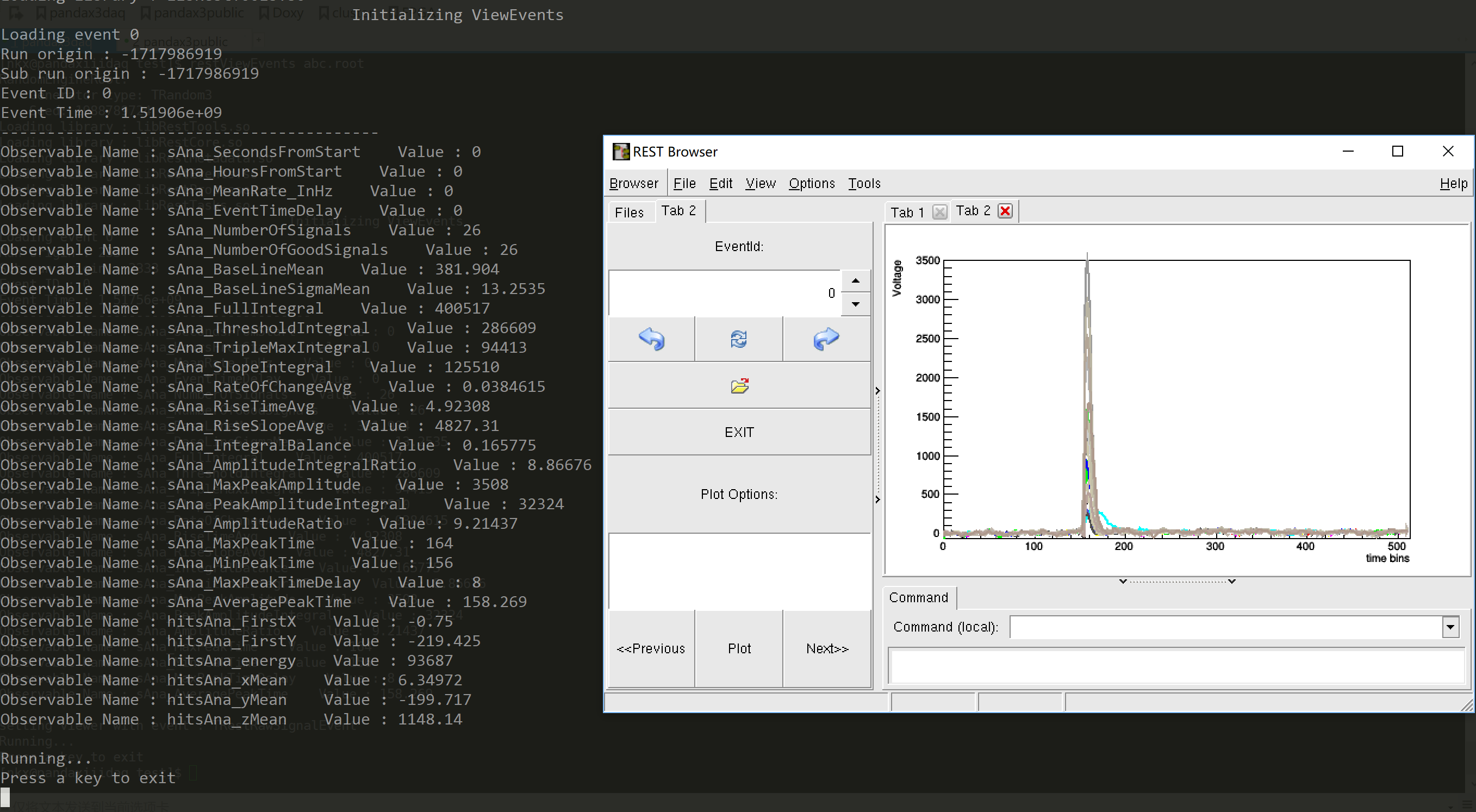
The screenshot shows a TRestTrackEvent. The event type selector in the left panel can be used to switch between the event types available in the file, when more than one representation was stored. The entry and event ID controls can be used to move to a different event.
When an event is loaded, REST also prints information in the terminal. This includes the event ID and the analysis observables available for that entry, with their values. This is useful when checking that the event display and the observables in the analysis tree refer to the same event.
The viewer uses the event type stored in the file by default. If needed, the event type can also be specified explicitly:
REST_ViewEvents("myFile.root", "TRestDetectorSignalEvent");
There is also a convenience macro for detector signal events:
REST_ViewSignalEvent("myFile.root");
Draw analysis observables
Event displays show the event object itself. For scalar or vector observables, use the analysis tree:
ana_tree->Draw("energy");
With a selection:
ana_tree->Draw("energy", "nHits > 3");
Or draw one observable against another:
ana_tree->Draw("yMean:xMean", "", "colz");
This is normal ROOT drawing applied to the REST analysis tree. It is useful for quick checks, but it is different from drawing the event object with DrawEvent().
Common problems
If ev is null, the file may be an analysis-only file without stored event objects. In that case, the analysis tree may still be available through ana_tree, but event displays will not work.
If the graphics window does not open, make sure the session has graphical display support. On a remote machine, this may require X11 forwarding or another configured display.
If restViewEvents is not found, open the file with restRoot and call the macro from the prompt:
REST_ViewEvents("myFile.root");