 |
REST-for-Physics
v2.3
Rare Event Searches ToolKit for Physics
|
Loading...
Searching...
No Matches
|
REST-for-Physics
v2.3
Rare Event Searches ToolKit for Physics
|
Perform the plot over datasets.
Default constructor.
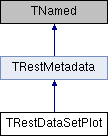
This class is meant to perform the plots over a TRestDataSet and it is meant to replace TRestAnalysisPlot. A dataset is should be provided as input file in order to perform de plots, in addition the possibility to provide a file pattern is also supported for backward compatibility although this method will be deprecated. The rml file has been modified with respect to TRestAnalysisPlot, major changes are that now a TRestCut must be defined in advance in order to perform the cuts over the dataset, in addition the panel/label metadata has been changed in order to distinguish between metadata, variables or observable values.
The rml file can be splitted in three main blocks that are detailed below;
The key addCut can be povided in order to perform the cut to the entire dataSet. Note that the TRestCut must be defined inside the rml and several cuts can be added.
Example of TRestDataSetPlot basic parameters with a set of TRestCuts:
Basic panel parameters:
Different keys are provided:
Note that the time-related variables startTime, endTime and runLength (then meanRate too) are obtained from the TRestDataSet and not the RDataFrame of the TRestDataSet, thus they are not afected by the cuts. All the keys have the following parameters:
The key addCut can be povided in order to perform the cut to the panel. Note that the TRestCut must be defined inside the rml.
Example of panel rule:
Basic plot parameters:
Use the histo key inside plot to add the plot parameters. You can add as many histograms as you want but note that only 1D and 2D histograms are supported.
In order to add one or two variables to the histogram please use the variable key. In order to perform a 2D plot you should add two variable keys, where the first one corresponds to the X axis. The variable key has the following parameters:
addCut` can be povided in order to perform the cut to the histogram. Note that the TRestCut must be defined inside the rml.
Example of plot rule:
Following example creates one panel and three plots including one or two histograms:
Figure to be added (a png image should be uploaded to the ./images/ directory)
REST-for-Physics - Software for Rare Event Searches Toolkit
History of developments:
2023-04: First implementation of TRestDataSetPlot, based on TRestAnalysisPlot JuanAn Garcia
2024-05: Extend some functionalities, Álvaro Ezquerro
ClassImp(TRestDataSetPlot); */
/**
Definition at line 33 of file TRestDataSetPlot.h.
#include <TRestDataSetPlot.h>
Data Structures | |
| struct | HistoInfo |
| Nested classes for internal use only. More... | |
| struct | PanelInfo |
| Auxiliary class for panels/labels. More... | |
| struct | PlotInfo |
| Auxiliary struct for plots/pads. More... | |
Public Member Functions | |
| ClassDefOverride (TRestDataSetPlot, 3) | |
| void | CleanUp () |
| Clean up histos and text but note that the metadata is unchanged. | |
| void | GenerateDataSetFromFilePattern (TRestDataSet &dataSet) |
| This functions generates a dataSet based on the information of the rml file. A TRestDataSet is pased as reference and will be overwritten. | |
| Int_t | GetIDFromMapString (const std::map< std::string, int > &mapStr, const std::string &in) |
| This functions gets the ID from a map string that is passed by reference. It is used to translate colors, line styles and fill styles from the string to an integer value. | |
| void | Initialize () override |
| Function to initialize input/output event members and define the section name. | |
| void | PlotCombinedCanvas () |
| This functions performs the plot of the combined canvas with the different panels and plots. | |
| void | PrintMetadata () override |
| Prints on screen the information about the metadata members of TRestDataSetPlot. | |
| TRestCut * | ReadCut (TRestCut *cut, TiXmlElement *ele=nullptr) |
| this function is used to add the different cuts provided in different metadata sections, it uses as parameter the cut where the cut is meant to be added and returns the added cut. If *cut is a nullptr it just instantiate it | |
| void | ReadPanelInfo () |
| This function reads the config file panel info and stores it in a vector of PanelInfo. | |
| void | ReadPlotInfo () |
| This function reads the config file plot info and stores it in a vector of PlotInfo. | |
| TRestDataSetPlot (const char *configFilename, std::string name="") | |
| Constructor loading data from a config file. | |
| ~TRestDataSetPlot () | |
| Default destructor. | |
| Public Member Functions inherited from TRestMetadata | |
| void | AddLog (std::string log="", bool print=true) |
| Add logs to messageBuffer. | |
| void | DoNotStore () |
| If this method is called the metadata information will not be stored in disk. | |
| TVector2 | Get2DVectorParameterWithUnits (std::string parName, TVector2 defaultValue=TVector2(-1, -1)) |
| TVector3 | Get3DVectorParameterWithUnits (std::string parName, TVector3 defaultValue=TVector3(-1, -1, -1)) |
| TString | GetCommit () |
| Returns the REST commit value stored in fCommit. | |
| std::string | GetConfigBuffer () |
| Returns the config section of this class. | |
| std::string | GetDataMemberValue (std::string memberName) |
| Get the value of data member as string. | |
| std::vector< std::string > | GetDataMemberValues (std::string memberName, Int_t precision=0) |
| Get the value of datamember as a vector of strings. | |
| TString | GetDataPath () |
| Returns a std::string with the path used for data storage. | |
| Double_t | GetDblParameterWithUnits (std::string parName, Double_t defaultValue=PARAMETER_NOT_FOUND_DBL) |
| Gets the value of the parameter name parName, after applying unit conversion. | |
| Bool_t | GetError () const |
| It returns true if an error was identified by a derived metadata class. | |
| TString | GetErrorMessage () |
| Returns a std::string containing the error message. | |
| TString | GetLibraryVersion () |
| Returns the REST libraty version stored in fLibraryVersion. | |
| TString | GetMainDataPath () |
| Gets a std::string with the path used for data storage. | |
| Int_t | GetNumberOfErrors () const |
| Int_t | GetNumberOfWarnings () const |
| std::string | GetParameter (std::string parName, TString defaultValue=PARAMETER_NOT_FOUND_STR) |
| Returns corresponding REST Metadata parameter from multiple sources. | |
| std::string | GetSectionName () |
| Returns the section name of this class, defined at the beginning of fSectionName. | |
| TRestStringOutput::REST_Verbose_Level | GetVerboseLevel () |
| returns the verboselevel in type of REST_Verbose_Level enumerator | |
| TString | GetVerboseLevelString () |
| returns the verbose level in type of TString | |
| TString | GetVersion () |
| Returns the REST version stored in fVersion. | |
| Int_t | GetVersionCode () |
| UInt_t | GetVersionMajor () const |
| UInt_t | GetVersionMinor () const |
| UInt_t | GetVersionPatch () const |
| Bool_t | GetWarning () const |
| It returns true if an error was identified by a derived metadata class. | |
| TString | GetWarningMessage () |
| Returns a std::string containing the warning message. | |
| TRestMetadata * | InstantiateChildMetadata (int index, std::string pattern="") |
| This method will retrieve a new TRestMetadata instance of a child element of the present TRestMetadata instance based on the index given by argument, which defines the element order to be retrieved, 0 for first element found, 1 for the second element found, etc. | |
| TRestMetadata * | InstantiateChildMetadata (std::string pattern="", std::string name="") |
| This method will retrieve a new TRestMetadata instance of a child element of the present TRestMetadata instance based on the name given by argument. | |
| Bool_t | isCleanState () const |
| Bool_t | isOfficialRelease () const |
| Int_t | LoadConfigFromBuffer () |
| Initialize data from a string element buffer. | |
| Int_t | LoadConfigFromElement (TiXmlElement *eSectional, TiXmlElement *eGlobal, std::map< std::string, std::string > envs={}) |
| Main starter method. | |
| Int_t | LoadConfigFromFile (const std::string &configFilename, const std::string §ionName="") |
| Give the file name, find out the corresponding section. Then call the main starter. | |
| virtual void | Merge (const TRestMetadata &) |
| TRestMetadata & | operator= (const TRestMetadata &) |
| void | Print () |
| Implementing TObject::Print() method. | |
| void | PrintConfigBuffer () |
| Print the config xml section stored in the class. | |
| void | PrintMessageBuffer () |
| Print the buffered message. | |
| void | PrintTimeStamp (Double_t timeStamp) |
| Print the current time on local machine. | |
| void | SetConfigFile (std::string configFilename) |
| set config file path from external | |
| void | SetError (std::string message="", bool print=true, int maxPrint=5) |
| A metadata class may use this method to signal that something went wrong. | |
| void | SetHostmgr (TRestManager *m) |
| Set the host manager for this class. | |
| void | SetSectionName (std::string sName) |
| set the section name, clear the section content | |
| void | SetVerboseLevel (TRestStringOutput::REST_Verbose_Level v) |
| sets the verbose level | |
| void | SetWarning (std::string message="", bool print=true, int maxPrint=5) |
| A metadata class may use this method to signal that something went wrong. | |
| void | Store () |
| If this method is called the metadata information will be stored in disk. | |
| TRestMetadata (const TRestMetadata &) | |
| virtual void | UpdateMetadataMembers () |
| Method to allow implementation of specific metadata members updates at inherited classes. | |
| virtual Int_t | Write (const char *name=nullptr, Int_t option=0, Int_t bufsize=0) |
| overwriting the write() method with fStore considered | |
| void | WriteConfigBuffer (std::string fName) |
| Writes the config buffer to a file in append mode. | |
| ~TRestMetadata () | |
| TRestMetadata default destructor. | |
Private Member Functions | |
| void | InitFromConfigFile () override |
| Initialization of specific TRestDataSetPlot members through an RML file. | |
Private Attributes | |
| const std::map< std::string, int > | ColorIdMap |
| Maps for internal use only. | |
| TVector2 | fCanvasDivisionMargins = TVector2(0.01, 0.01) |
| TVector2 | fCanvasDivisions = TVector2(2, 2) |
| TVector2 | fCanvasSize = TVector2(800, 600) |
| Canvas options, size, divisions and margins. | |
| TRestCut * | fCut = nullptr |
| Global cut for the entire dataSet. | |
| std::string | fDataSetName = "" |
| Name of the dataset to be imported. | |
| const std::map< std::string, int > | FillStyleMap |
| FillStyleMap as enum "EFillStyle" defined in TAttFill.h. | |
| Double_t | fLegendX1 = 0.7 |
| Legend position and size. | |
| Double_t | fLegendX2 = 0.88 |
| Double_t | fLegendY1 = 0.75 |
| Double_t | fLegendY2 = 0.88 |
| std::string | fOutputFileName = "" |
| OutputFileName. | |
| Int_t | fPaletteStyle = 57 |
| Palette style. | |
| std::vector< PanelInfo > | fPanels |
| Vector with panels/label options. | |
| std::vector< PlotInfo > | fPlots |
| Vector with plots/pads options. | |
| Bool_t | fPreviewPlot = true |
| Preview plot. | |
| const std::map< std::string, int > | LineStyleMap |
| LineStyleMap as enum "ELineStyle" defined in TAttLine.h. | |
Additional Inherited Members | |
| Protected Member Functions inherited from TRestMetadata | |
| std::string | ElementToString (TiXmlElement *ele) |
| Convert an TiXmlElement object to string. | |
| TVector2 | Get2DVectorParameterWithUnits (std::string parName, TiXmlElement *e, TVector2 defaultValue=TVector2(-1, -1)) |
| TVector3 | Get3DVectorParameterWithUnits (std::string parName, TiXmlElement *e, TVector3 defaultValue=TVector3(-1, -1, -1)) |
| Double_t | GetDblParameterWithUnits (std::string parName, TiXmlElement *e, Double_t defaultVal=PARAMETER_NOT_FOUND_DBL) |
| TiXmlElement * | GetElement (std::string eleDeclare, TiXmlElement *e=nullptr) |
| Get an xml element from a given parent element, according to its declaration. | |
| TiXmlElement * | GetElementFromFile (std::string configFilename, std::string NameOrDecalre="") |
| Open an xml encoded file and find its element. | |
| TiXmlElement * | GetElementWithName (std::string eleDeclare, std::string eleName) |
| Get an xml element from the default location, according to its declaration and its field "name". | |
| TiXmlElement * | GetElementWithName (std::string eleDeclare, std::string eleName, TiXmlElement *e) |
| Get an xml element from a given parent element, according to its declaration and its field "name". | |
| std::string | GetFieldValue (std::string fieldName, std::string definition, size_t fromPosition=0) |
| Gets field value in an xml element string by parsing it as TiXmlElement. | |
| std::string | GetFieldValue (std::string parName, TiXmlElement *e) |
| Returns the field value of an xml element which has the specified name. | |
| std::string | GetKEYDefinition (std::string keyName) |
| Gets the first key definition for keyName found inside buffer starting at fromPosition. | |
| std::string | GetKEYDefinition (std::string keyName, size_t &Position) |
| std::string | GetKEYDefinition (std::string keyName, size_t &Position, std::string buffer) |
| std::string | GetKEYDefinition (std::string keyName, std::string buffer) |
| std::string | GetKEYStructure (std::string keyName) |
| Gets the first key structure for keyName found inside buffer after fromPosition. | |
| std::string | GetKEYStructure (std::string keyName, size_t &Position) |
| std::string | GetKEYStructure (std::string keyName, size_t &Position, std::string buffer) |
| std::string | GetKEYStructure (std::string keyName, size_t &Position, TiXmlElement *ele) |
| std::string | GetKEYStructure (std::string keyName, std::string buffer) |
| TiXmlElement * | GetNextElement (TiXmlElement *e) |
| Get the next sibling xml element of this element, with same eleDeclare. | |
| std::string | GetParameter (std::string parName, size_t &pos, std::string inputString) |
| Returns the value for the parameter name parName found in inputString. | |
| std::string | GetParameter (std::string parName, TiXmlElement *e, TString defaultValue=PARAMETER_NOT_FOUND_STR) |
| Returns the value for the parameter named parName in the given section. | |
| std::pair< std::string, std::string > | GetParameterAndUnits (std::string parname, TiXmlElement *e=nullptr) |
| Returns the unit string of the given parameter of the given xml section. | |
| std::map< std::string, std::string > | GetParametersList () |
| It retrieves a map of all parameter:value found in the metadata class. | |
| TString | GetSearchPath () |
| virtual void | InitFromRootFile () |
| Method called after the object is retrieved from root file. | |
| virtual Int_t | LoadSectionMetadata () |
| This method does some preparation of xml section. | |
| void | ReadAllParameters () |
| Reflection methods, Set value of a datamember in class according to TRestMetadata::fElement. | |
| void | ReadParametersList (std::map< std::string, std::string > &list) |
| It reads a parameter list and associates it to its corresponding metadata member. par0 --> fPar0. | |
| std::string | ReplaceConstants (const std::string buffer) |
| Identifies "constants" in the input buffer, and replace them with corresponding value. | |
| std::string | ReplaceVariables (const std::string buffer) |
| Identifies environmental variable replacing marks in the input buffer, and replace them with corresponding value. | |
| void | ReSetVersion () |
| Resets the version of TRestRun to REST_RELEASE. Only TRestRun is allowed to update version. | |
| std::string | SearchFile (std::string filename) |
| Search files in current directory and directories specified in "searchPath" section. | |
| void | SetLibraryVersion (TString version) |
| Set the library version of this metadata class. | |
| TiXmlElement * | StringToElement (std::string definition) |
| Parsing a string into TiXmlElement object. | |
| TRestMetadata () | |
| TRestMetadata default constructor. | |
| TRestMetadata (const char *configFilename) | |
| constructor | |
| void | UnSetVersion () |
| Resets the version of TRestRun to -1, in case the file is old REST file. Only TRestRun is allowed to update version. | |
| Protected Attributes inherited from TRestMetadata | |
| std::string | configBuffer |
| The buffer where the corresponding metadata section is stored. Filled only during Write(). | |
| std::string | fConfigFileName |
| Full name of the rml file. | |
| std::map< std::string, std::string > | fConstants |
| Saving a list of rml constants. name-value std::pair. Constants are temporary for this class only. | |
| TiXmlElement * | fElement |
| Saving the sectional element together with global element. | |
| TiXmlElement * | fElementGlobal |
| Saving the global element, to be passed to the resident class, if necessary. | |
| Bool_t | fError = false |
| It can be used as a way to identify that something went wrong using SetError method. | |
| TString | fErrorMessage = "" |
| A std::string to store an optional error message through method SetError. | |
| TRestManager * | fHostmgr |
| All metadata classes can be initialized and managed by TRestManager. | |
| Int_t | fNErrors = 0 |
| It counts the number of errors notified. | |
| Int_t | fNWarnings = 0 |
| It counts the number of warnings notified. | |
| std::string | fSectionName |
| Section name given in the constructor of the derived metadata class. | |
| Bool_t | fStore |
| This variable is used to determine if the metadata structure should be stored in the ROOT file. | |
| std::map< std::string, std::string > | fVariables |
| Saving a list of rml variables. name-value std::pair. | |
| TRestStringOutput::REST_Verbose_Level | fVerboseLevel |
| Verbose level used to print debug info. | |
| Bool_t | fWarning = false |
| It can be used as a way to identify that something went wrong using SetWarning method. | |
| TString | fWarningMessage = "" |
| It can be used as a way to identify that something went wrong using SetWarning method. | |
| std::string | messageBuffer |
| The buffer to store the output message through TRestStringOutput in this class. | |
| endl_t | RESTendl |
| Termination flag object for TRestStringOutput. | |
| TRestDataSetPlot::TRestDataSetPlot | ( | ) |
Definition at line 304 of file TRestDataSetPlot.cxx.
| TRestDataSetPlot::TRestDataSetPlot | ( | const char * | configFilename, |
| std::string | name = "" ) |
Constructor loading data from a config file.
Definition at line 309 of file TRestDataSetPlot.cxx.
| TRestDataSetPlot::~TRestDataSetPlot | ( | ) |
Default destructor.
Definition at line 319 of file TRestDataSetPlot.cxx.
| void TRestDataSetPlot::CleanUp | ( | ) |
Clean up histos and text but note that the metadata is unchanged.
Definition at line 1015 of file TRestDataSetPlot.cxx.
| void TRestDataSetPlot::GenerateDataSetFromFilePattern | ( | TRestDataSet & | dataSet | ) |
This functions generates a dataSet based on the information of the rml file. A TRestDataSet is pased as reference and will be overwritten.
Definition at line 527 of file TRestDataSetPlot.cxx.
| Int_t TRestDataSetPlot::GetIDFromMapString | ( | const std::map< std::string, int > & | mapStr, |
| const std::string & | in ) |
This functions gets the ID from a map string that is passed by reference. It is used to translate colors, line styles and fill styles from the string to an integer value.
Definition at line 1037 of file TRestDataSetPlot.cxx.
|
overrideprivatevirtual |
Initialization of specific TRestDataSetPlot members through an RML file.
Reimplemented from TRestMetadata.
Definition at line 330 of file TRestDataSetPlot.cxx.
|
overridevirtual |
Function to initialize input/output event members and define the section name.
Reimplemented from TRestMetadata.
Definition at line 325 of file TRestDataSetPlot.cxx.
| void TRestDataSetPlot::PlotCombinedCanvas | ( | ) |
This functions performs the plot of the combined canvas with the different panels and plots.
Build the histograms and add them to the THStack
Definition at line 626 of file TRestDataSetPlot.cxx.
|
overridevirtual |
Prints on screen the information about the metadata members of TRestDataSetPlot.
Reimplemented from TRestMetadata.
Definition at line 1053 of file TRestDataSetPlot.cxx.
this function is used to add the different cuts provided in different metadata sections, it uses as parameter the cut where the cut is meant to be added and returns the added cut. If *cut is a nullptr it just instantiate it
Definition at line 348 of file TRestDataSetPlot.cxx.
| void TRestDataSetPlot::ReadPanelInfo | ( | ) |
This function reads the config file panel info and stores it in a vector of PanelInfo.
Definition at line 369 of file TRestDataSetPlot.cxx.
| void TRestDataSetPlot::ReadPlotInfo | ( | ) |
This function reads the config file plot info and stores it in a vector of PlotInfo.
Definition at line 449 of file TRestDataSetPlot.cxx.
|
private |
Maps for internal use only.
ColorIdMap as enum "EColor" defined in Rtypes.h
Definition at line 109 of file TRestDataSetPlot.h.
|
private |
Definition at line 157 of file TRestDataSetPlot.h.
|
private |
Definition at line 156 of file TRestDataSetPlot.h.
|
private |
Canvas options, size, divisions and margins.
Definition at line 155 of file TRestDataSetPlot.h.
|
private |
Global cut for the entire dataSet.
Definition at line 140 of file TRestDataSetPlot.h.
|
private |
Name of the dataset to be imported.
Definition at line 134 of file TRestDataSetPlot.h.
|
private |
FillStyleMap as enum "EFillStyle" defined in TAttFill.h.
Definition at line 120 of file TRestDataSetPlot.h.
|
private |
Legend position and size.
Definition at line 149 of file TRestDataSetPlot.h.
|
private |
Definition at line 151 of file TRestDataSetPlot.h.
|
private |
Definition at line 150 of file TRestDataSetPlot.h.
|
private |
Definition at line 152 of file TRestDataSetPlot.h.
|
private |
OutputFileName.
Definition at line 137 of file TRestDataSetPlot.h.
|
private |
Palette style.
Definition at line 143 of file TRestDataSetPlot.h.
|
private |
Vector with panels/label options.
Definition at line 163 of file TRestDataSetPlot.h.
|
private |
Vector with plots/pads options.
Definition at line 160 of file TRestDataSetPlot.h.
|
private |
Preview plot.
Definition at line 146 of file TRestDataSetPlot.h.
|
private |
LineStyleMap as enum "ELineStyle" defined in TAttLine.h.
Definition at line 116 of file TRestDataSetPlot.h.
 1.15.0